

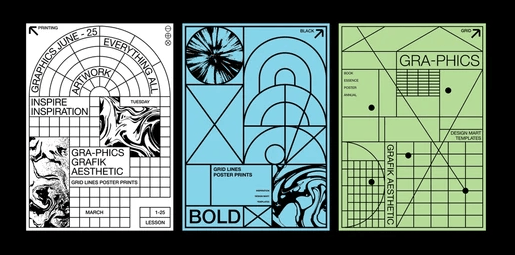
If you’ve spent any time in graphic design, you probably know the exact feeling of adjusting margins by half a millimeter at two in the morning. You zoom in to 400%, nudge a headline three pixels to the left, adjust the tracking, zoom back out, and ask yourself: Does this actually feel balanced, or am I just staring at it too hard?
For decades, layout design has been an exercise in manual precision. We inherited the grid from the Swiss masters of the 1950s—Josef Müller-Brockmann, Emil Ruder, and Karl Gerstner—who taught us that structure builds clarity. But as design has shifted from static print to dynamic digital spaces, the way we create those structures has undergone a quiet revolution.
We are no longer just placing elements on a grid. We are building the rules that generate the grid itself.
Welcome to the world of algorithmic grids and parametric layout logic. Whether you are a creative coder scripting in p5.js, a brand designer building responsive identity systems, or an enthusiast exploring generative art tools, understanding parametric layout logic changes how you think about composition.
In this guide, we’ll demystify what parametric layout logic actually is, break down how algorithmic grids work under the hood, and explore practical ways you can integrate these generative techniques into your creative workflow.
1. From Swiss Precision to Computational Rules
To understand where generative layouts are going, it helps to look at where they came from.
The traditional Swiss Style (or International Typographic Style) relied on rigid, modular grid systems. A designer would decide on a set number of columns—say, a 12-column grid—and manually position typography, imagery, and whitespace within those boundaries. The strength of this system was predictability and order.
In 1968, designer Karl Gerstner published a visionary book titled Designing Programmes. Instead of designing a single solution to a design problem, Gerstner proposed designing a program—a set of flexible rules that could produce an infinite variety of solutions while maintaining a cohesive visual DNA.
Fast forward to today, and Gerstner’s philosophy has become the foundation of generative design. Instead of drawing fixed boxes on a canvas, modern designers write conditional logic:
- Traditional approach: “Put the main header in Column 1, extending across 8 columns at 48pt type.”
- Parametric approach: “Take the character count of the title. If it exceeds 20 characters, scale the typography down by a factor of
, divide the upper quadrant into three horizontal bands, and anchor the visual element to the mathematical center of gravity of the canvas.”
In an algorithmic grid, the system responds dynamically to its inputs. The layout isn’t a fixed blueprint; it’s an living organism driven by rules, constraints, and relationships.
2. Deconstructing Parametric Layout Logic
“Parametric” sounds like a heavy engineering buzzword, but the core concept is surprisingly intuitive. If you’ve ever used a formula in a spreadsheet where changing cell A1 automatically updates cell B12, you’ve already worked parametrically.
In generative poster design, parametric logic relies on three core components: Inputs, Constraints, and Transforms.
[ Inputs / Data ] —> [ Parametric Rules & Constraints ] —> [ Algorithmic Layout Output ]
– Canvas Aspect Ratio – Hierarchy Priorities – Unique Poster Variant
– Text Length – Minimum Margins & Scale Limits – Dynamic Grid Subdivision
– Seed / Random Value – Color Palette Distribution – Parametric Typography
A. Inputs (The Variables)
Inputs are the raw data fed into your system. These can be fixed or fluctuating. Common inputs include:
- Canvas dimensions and aspect ratio (A4, 16:9, square stories)
- Text content length (a headline with 3 words vs. 15 words)
- External data streams (weather feeds, audio frequencies, time of day)
- User-controlled sliders or random seed numbers
B. Constraints (The Guardrails)
Without constraints, generative code quickly devolves into chaos. Constraints are the non-negotiable design principles programmed into the logic to ensure readability and aesthetic balance:
- Minimum padding between text boxes and canvas edges
- Strict typographic scale ratios (e.g., heading size must always be at least
body text size)
- Color contrast thresholds to preserve accessibility
C. Transforms (The Layout Engine)
This is where the magic happens. The design system takes the inputs, evaluates them against the constraints, and calculates the exact spatial positions of every graphic element.
For example, instead of manually placing four images, a recursive subdivision algorithm might take your canvas, slice it in half vertically, take one of those halves and slice it horizontally, and continue subdividing based on the aspect ratios of the images provided.
3. Popular Algorithmic Grid Structures
Generative poster design isn’t limited to standard rectangular boxes. Designers use several mathematical and computational frameworks to create striking compositional systems:
1. Packing Algorithms (Space Filling)
Have you ever wondered how software neatly arranges disparate objects without them overlapping? Circle packing and rectangle packing algorithms calculate the maximum available space on a canvas and fit elements into it like a real-time puzzle. In poster design, this creates dense, high-energy compositions where text and graphics interlocking seamlessly.
2. Voronoi Diagrams & Delaunay Triangulation
By scattering random points across a canvas and mathematically computing the regions closest to each point, Voronoi algorithms generate natural, organic grid cells. These are ideal for posters that need an avant-garde, cellular layout where typography curves and wraps around polygonal boundaries.
3. Domain Warping & Perlin Noise Fields
When you want a poster to feel fluid and continuous rather than strictly geometric, vector fields generated by Perlin noise can offset standard grid intersections. The grid remains structurally sound, but elements gently distort along mathematical curves, creating a sense of motion across the page.
4. Bridging Code and Creativity: The Modern Workflow
You don’t need a computer science degree to start experimenting with algorithmic layout logic. The modern creative landscape offers a spectrum of entry points depending on your workflow and comfort level.
ACCESSIBILITY SPECTRUM FOR GENERATIVE POSTER DESIGN
Low Code / No Code Hybrid Workflows Pure Code
[ Visual Generators / AI ] <—–> [ Modular Nodes / Tools ] <—–> [ Scripting Frameworks ]
– Rapid composition testing – TouchDesigner – p5.js / Processing
– Prompt-driven layout ideation – Cavalry – Canvas API / SVG
– High-volume visual exploration – Figma Parametric Plugins – Custom shaders
Pure Code Frameworks
For maximum control, toolkits like p5.js, Processing, and NodeBox allow you to write custom procedural layouts from line one. You control every math function, bezier curve, and typographic loop.
Node-Based Motion & Layout Tools
Software like TouchDesigner or Cavalry offers visual programming interfaces. You connect nodes representing data sources, grid arrays, and noise maps visually—giving you computational power without requiring hundreds of lines of JavaScript.
AI-Driven Layout Ideation
Generative AI has added a fascinating new dimension to compositional prototyping. When exploring layout concepts, using a free AI poster generator can serve as an incredible rapid prototyping sandbox. By feeding the tool spatial prompts or parametric parameters, you can test dozens of compositional hierarchies, color palettes, and structural balances in seconds before moving into manual execution or code refine.
The key to a professional workflow is viewing these automated and AI tools not as final output generators, but as ideation partners. An AI generator can show you surprising arrangements of negative space or unexpected scale contrasts that you might not have conceived manually. From there, you can extract those underlying grid logic ideas and execute them with pixel-perfect precision in your vector editor or script.
5. Practical Guide: Building a Simple Parametric System
If you want to start thinking parametrically in your next poster project—even inside traditional tools like Illustrator, Figma, or InDesign—follow this step-by-step framework:
Step 1: Define Your Invariants (What Never Changes)
Identify the elements that anchor the identity. For example:
- The primary font family stays fixed.
- The brand color palette is restricted to 3 swatches.
- The logo always sits in a safety margin area.
Step 2: Establish Your Variable Rules
Decide which elements will respond to context:
- Rule: “The font size of the main event title is inversely proportional to the character count.” (Short title = massive focal point; long title = multi-line structural block).
- Rule: “The background geometric shapes inherit their coordinates from the date of the event.” (e.g., Oct 24 creates a grid of
modules).
Step 3: Introduce Controlled Randomness
Pure math can feel cold; pure randomness feels messy. The sweet spot is controlled randomness (often called pseudorandomness or seeded noise). Use random values within a bounded range—such as allowing element rotation to vary only between and
—to add human warmth without destroying visual structure.
Step 4: Curate the Outputs
Generative layout logic shifts your role from creator to curator. When your system generates 50 poster variations based on your rules, your job is to apply human intuition, artistic taste, and emotional resonance to select and polish the winning compositions.
Conclusion: The Designer as the System Architect
Algorithmic grids and parametric layout logic aren’t here to eliminate the designer’s touch; they are here to amplify it. By shifting our perspective from designing single static outcomes to constructing flexible systems of rules, we unlock a massive creative playground.
When you step back and look at generative posters through this lens, the computer ceases to be just a digital drawing board. It becomes an active creative collaborator—stretching your ideas, testing spatial possibilities, and pushing composition beyond the boundaries of manual arrangement.
The next time you open a blank canvas, don’t just start drawing boxes. Ask yourself: What are the rules of this universe, and what happens when I let the layout generate itself?



 What Is a Niche Perfume House, and How Is It Different from a Designer?